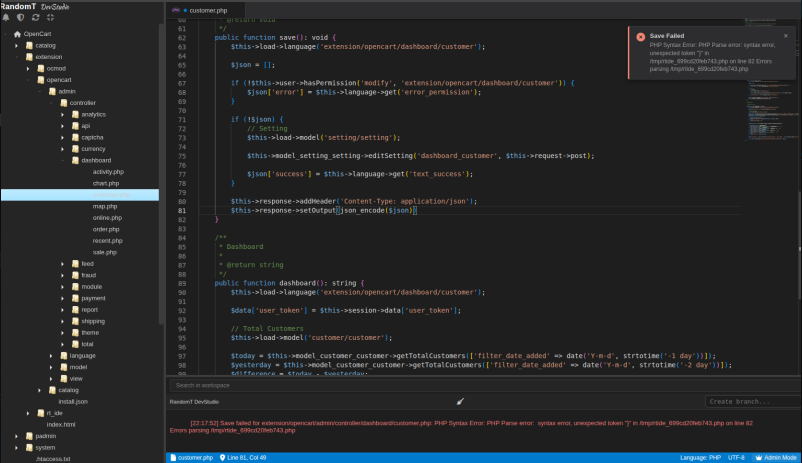
The OpenCart file manager has a text editor that is essentially a text editor — no validation, no syntax highlighting, no multiple tabs, and tedious navigation. When developing and debugging extensions, every error 500 meant switching to cPanel, navigating the file tree manually, editing, saving, and hoping. This was the friction that led to DevStudio.
The starting point was the same context as the bakery ERP and other RandomT extensions: developing inside OpenCart every day made the limitations of the built-in tooling impossible to ignore.
The file editor in OpenCart admin performs no PHP validation before saving. A syntax error produces a 500 with no immediate feedback. There is no way to have multiple files open simultaneously, no session restore, and no visibility into the error log without leaving the admin. For anyone doing active development inside OpenCart, this creates constant context switching.
DevStudio is built as an OpenCart extension — it lives inside the admin, follows the MVC structure, and integrates with OpenCart's own settings and permission systems. Rather than working around OpenCart, it extends it.
The first functional version was working within a week. From that point, all further development of DevStudio was done inside DevStudio itself — editing its own files, testing changes, rolling back to stable versions when something broke. This gave an unexpected insight into why compilers are used to build their own next versions: once the tool is stable enough to be useful, it becomes the most natural environment to develop itself.
DevStudio integrates with two additional modules — RT Sentinel for error monitoring and RT HUB Client for license validation — which are covered separately given the complexity involved in building them.
The editor
Built on Monaco Editor — the same editor that powers VSCode — embedded in a Twig template. File navigation uses jsTree. Supports PHP, Twig, JS, CSS, SQL and other formats with syntax highlighting and multiple tabs.
PHP validation
Before every save, a temporary file is created and a syntax check is run against it. If errors are found, the save is blocked and a notification is returned. No file is written with broken PHP.
Auto-backup
A .backup.YmdHis file is created before every save. Cache clearing is intelligent — Twig cache clears on .twig files, theme cache on .css, modification cache on .xml.
Session persistence
Cursor position and scroll state are persisted per user per file in oc_rt_ide_sessions and restored on next open.
Terminal
The terminal is read-only by design — it displays error messages and search results, not execute code. Executing arbitrary code was considered but ruled out on security grounds, and this is a free community release.
Global search across the workspace returns the first 10 results with file paths — either using Monaco's native local search or a custom global search function. Results are displayed in the terminal panel. Branch management is also handled through terminal commands: branch ls lists branches for the current file, branch create <name> creates one, and branch restore <name> restores the file from a saved branch.
Command palette
Provides quick access to common actions: refresh the file tree, clear the terminal, open workspace search, open config.php or robots.txt directly, switch between Monaco's built-in dark and light themes, open the Sentinel dashboard, and show keyboard shortcuts.
Keyboard shortcuts
| Shortcut | Action |
|---|---|
Ctrl+S | Save current file |
Ctrl+Shift+S | Save all files |
Ctrl+W | Close current tab |
Ctrl+F | Search files |
F5 | Refresh file tree |
Activity log
All file operations are logged to oc_rt_ide_log — user, action, file path, timestamp. Paths are always validated with realpath() against the OpenCart root. Folders such as storage, vendor and node_modules are excluded from navigation.
A professional development environment running inside OpenCart admin — file explorer, Monaco editor, PHP validation before save, auto-backup, session restore, read-only terminal with global search, command palette, keyboard shortcuts, and activity logging — without leaving the admin panel.
The extension runs inside OpenCart's admin, which imposes structural constraints on what is possible in the front-end. Some UX decisions were shaped by those constraints rather than by what would be ideal in a standalone IDE. The terminal is intentionally read-only — code execution is not supported in this release.
RT Sentinel and RT HUB Client — the error monitoring and license validation modules that integrate with DevStudio — are covered in separate articles. They took significantly longer to build than the editor itself.